

In development
Aeron Copilot
An AI copilot for Microsoft Flight Simulator 2020 and 2024. It talks with you, runs checklists, prepares IFR approaches and works the aircraft’s systems, and it can fly the whole flight alone or help you as copilot. Today it supports the FlyByWire A32NX.
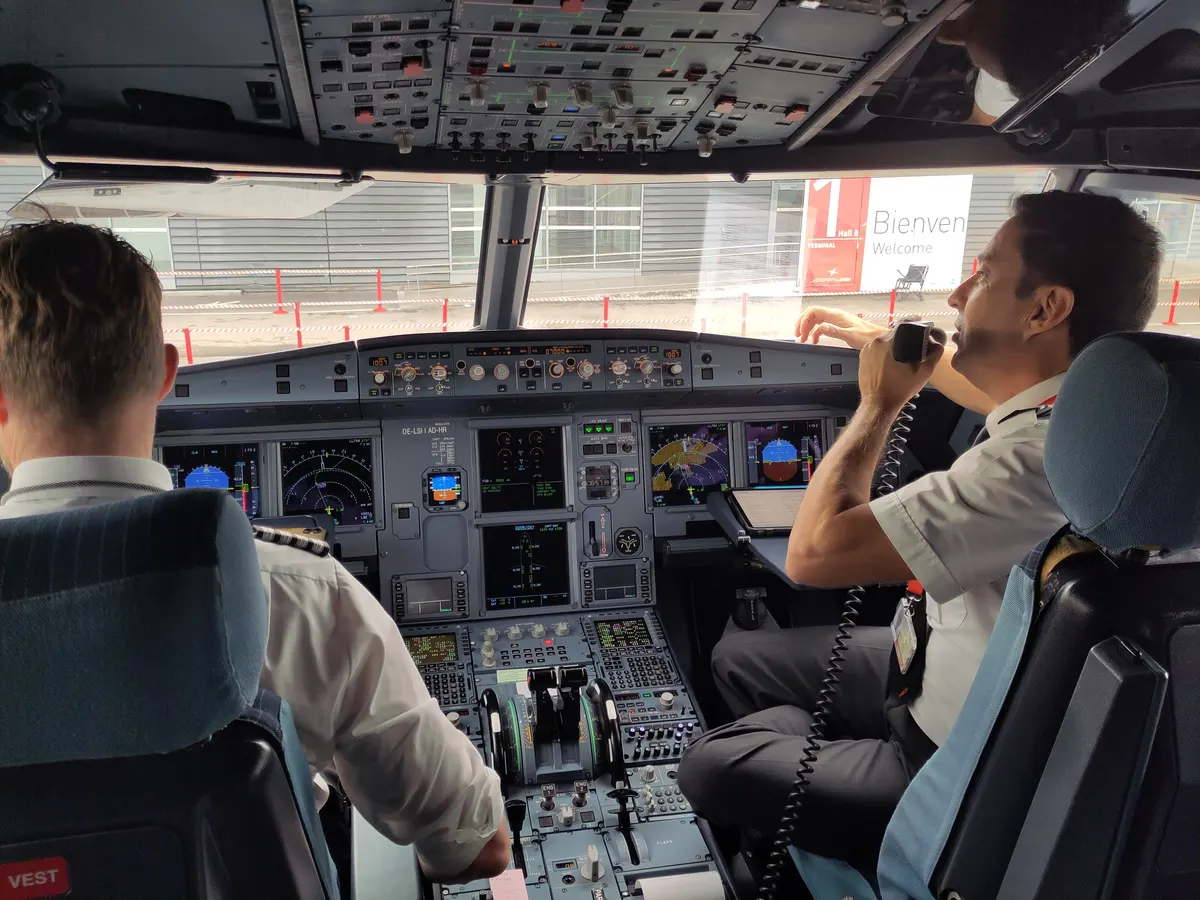
Airbus A320 cockpit with the crew · Photo: Exilexi, CC BY 4.0 · Credits
What it is
Everything as in real life. Aeron Copilot resolves things with the tools of the real cockpit (the ATC menu, the FCU, the MCDU) and follows real airline SOPs from Airbus and FlyByWire, instead of scripted, canned flows.
The realism of a real A320neo comes before shortcuts. It is built to talk with you, run checklists, prepare IFR approaches, look up minimums, help in emergencies and work the aircraft’s systems, flying it all itself or assisting the captain.
How a flight goes
Aeron Copilot can prepare the aircraft and then, on request, hand you the controls to take off. Or it flies the whole flight.
Preparation
It always fetches and validates your SimBrief plan first (departure airport, minimum fuel, maximum weights) and reports problems; with a serious one it only continues if you confirm. Then it works from cold and dark: power, the cockpit set-up per the FlyByWire SOP, ground services, boarding and fuel through the flyPad, and the FMS programming (INIT, flight plan, and PERF with trim and weights).
Pushback and taxi
Everything goes through the native ATC: ATIS, IFR clearance, pushback request, taxi and tower. It pushes back with engine start, runs the after-start items and taxis to the holding point.
Take-off
It sets the take-off configuration and lines up. On request it hands you the controls to take off; otherwise it flies the take-off itself, with take-off thrust per the runway and the Airbus callouts in English: “ONE HUNDRED KNOTS”, “V1”, “ROTATE”, “POSITIVE CLIMB”, “GEAR UP”.
Climb and cruise
It climbs with the flap and acceleration flows and sets STD at the transition altitude. It follows and checks every ATC instruction, checks in with the new controller on each frequency change, and never climbs above the cleared altitude. In cruise it checks the level and the fuel at destination against the flight plan, and handles seat belts for turbulence, anti-ice and TCAS traffic call-outs.
Descent and approach
About 15 minutes before top of descent it prepares the arrival: ATIS or METAR, runway, STAR, FMS programming, approach speed, autobrake and the briefing. It asks ATC for descent and only descends when cleared, never below the minimum safe altitude. It flies ILS, RNAV and non-precision approaches. It never invents a minimum: it looks for charts and data, and when none exist it uses a conservative minimum and says so in the briefing.
Landing
Autoland is preferred, with a manual landing as the alternative. It checks the stabilised-approach criteria (1000 ft in IMC, 500 ft in VMC) and goes around when the approach is outside them. Manual landing is one of the arrival behaviours still being validated live.
Gate
After landing it clears the runway and runs the after-landing flow, then taxis to the stand with ATC. At the stand it parks, disembarks and secures the aircraft back to cold and dark.
What you stay in charge of
You are the captain. Aeron Copilot works for you.
Take the controls at any time
Touch the sidestick, the thrust levers or the pedals and it answers: “Your control.”
STOP is always one click away
A STOP button, or saying “stop”. In flight it stops commanding, leaves the autopilot and autothrust as they are and says so. It never cuts thrust or switches things off.
The decisions are yours
When no landing is possible, you choose the other runway or the alternate. After two go-arounds, you decide what to do.
The plan has to be right
With a serious problem in your SimBrief plan, Aeron Copilot only continues if you confirm.
The interface
Aeron Copilot runs on your PC and you use it in a browser page, on a second monitor beside the simulator. Its interface is not shown here yet.
- Flight strip
- Airline, callsign, route and progress.
- Moving map
- The route flown and the route to fly, the animated aircraft and day and night shading, with time remaining, ETA, distance, ground speed, altitude, outside temperature and heading. A toggle switches between metric and imperial.
- Chat
- You talk to the copilot, and it answers even while it is handling flight events.
- Radio
- A separate panel with the ATC and the copilot’s transmissions.
- Copilot column
- State, simulator, aircraft, the STOP button and the action log.
- Flight logbook
- Each flight is saved as a Markdown note with the plan, the radio, warnings, failures and what ATC gave you, friendly to note-taking apps.
Requirements
More set-up will be documented at release.
- System
- Windows
- Simulator
- Microsoft Flight Simulator 2020 / 2024
- Aircraft
- FlyByWire A32NX, iniBuilds A350 (the whole family), FlyByWire A380, PMDG 777-300ER and others
- Flight plans
- A SimBrief account
Next to the copilot
Aeron ATC is the air traffic controller: a separate product that replaces the simulator’s built-in ATC and works with Aeron Copilot.
Talk to the people who build it.
Want to follow Aeron as it takes shape, or have an aviation software project in mind? Write to us on WhatsApp or by email.
- contact@vemryx.com
Contact
General questions, projects and partnerships.
- support@vemryx.com
Support
Help and questions about Aeron.
Singapore Airlines A380 lifting off · Photo: Damien Aiello (room added by Jebulon), CC BY-SA 4.0